Welcome to TechFed "technology for human kind"

Empowering young Engineers

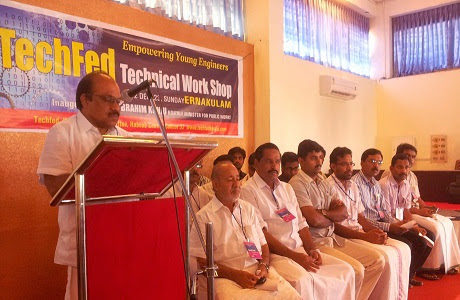
Mr.V.K.Ibrahim Kunju Hon Minister for Public Works Inaugurating the Technical Workshop at Ernakulam.

Technical Students Meet

Mr.T.P Ashraf Ali Syndicate Member University of Calicut Inaugurating the Technical Students Meet at Calicut.

Empowering young Engineers

Mr.Pramod Raman Manorama News Coordinating Editor Addressing TechFed Technical Workshop at Ernakulam.

Through the Campus

Mr.P.G Muhammed msf State General Secretary Addressing "through the campus" Campus Visit at Govt Engineering College Calicut.

Through the Campus

Mr.T.P Ashraf Ali Syndicate Member University of Calicut Inaugurating the "through the campus" Campus Visit at Govt Engineering College Calicut.

Technical Students Meet

Mr.P.K Firos Syndicate Member MG University Inaugurating the Technical Students Meet at Kottayam.

CH Muhammed Koya Memorial Book Bank

Mr.Nishad.K.Saleem TechFed State Chairman Addressing CH Muhammed Koya Memorial Book Bank at Rajiv Gandhi Institute of Technology Kottayam.

CH Muhammed Koya Memorial Book Bank

Mr.Ameen Nallur TechFed State General Convenor Addressing CH Muhammed Koya Memorial Book Bank at Rajiv Gandhi Institute of Technology Kottayam.

Empowering young Engineers

Mr.Shareef Vadakkayil msf State Professional wing Convenor Addressing the Technical Workshop at Ernakulam.

Regional Leaders Meet

Mr.T.A Fasil msf State Secretary Inaugurating the Regional Technical Leaders Meet at Ernakulam.

TechFed T-Shirt

technology for humen kind.

7 February 2012

Smartphone Made From Bamboo

Smartphone Made From Bamboo


LONDON: A 23-year-old British student will launch a mobile phone made largely from bamboo,The Telegraph reported.The smartphone, called 'ADzero', is expected to launch later this year. Made from four-year-old organically grown bamboo that has been treated to improve its durability, the phone runs Google's Android operating system.
white; background-image: initial; background-origin: initial; font-family: Georgia, serif; font-size: 14pt;">Kieron Scott-Woodhouse, from Shepherds Bushin London, designed the phone because he was frustrated that so many existing models looked similar to each other.

12 November 2011

India Post Launches ePost Office


India Post Launches ePost Office
Communications Minister Kapil Sibal launched the 'ePost Office' - the e-commerce portal of India Post which will provide postal transaction and tracking facilities to customers online, a statement said.
The portal will enable the customers to transact postal business any time and from anywhere using debit or credit cards.

"In the changing word, the ways we live are changing. Launch of e-Post is a step in this direction offering a bouquet of services to the consumers. This is in line with shift in marketing trend of service provider reaching the consumers," Sibal said.


The services offered by e-Post are electronic money order, instant money order, sale of philatelic stamps, postal information, and tracking of express and international shipments.
The ePost Office can be visited at epostoffice.gov.in

How To Get Facebook Timeline without waiting for official announcement?


How To Get Facebook Timeline without waiting for official announcement? 

 STEP 1 :Start facebook Developer Application.


1st like Developer appplication on here


Allow the permission


Click on "Create new application" a button that appears in the top right corner of the screen.   
                                      
 STEP 2 : Make a name for application


                                                      Its simplest to type in your full name for th 1st field.
                                 In the 2nd area type name availablity of name without space and continue  


                                  Then you will get security popup ..type correct words and submit.
                                                            STEP 3: Launch a open graph


                                  Click on the words "Open graph" and then click on "GET STRTED"


Click on save and changes that have 3 steps and finish.

NOW YOU ARE ALMOST COMPLETE...

STEP 4: Make timeline with coverphoto.
After few minutes you will get like below picture on you profile.

Click on "GET IT NOW"

You can upload cover photo on "add a cover".


After ward you will get like this...ARE YOU HAPPY..!!


How To Get Facebook Timeline without waiting for official announcement? 

 STEP 1 :Start facebook Developer Application.

1st like Developer appplication on here
Allow the permission

Click on "Create new application" a button that appears in the top right corner of the screen.   
                                      
 STEP 2 : Make a name for application
                                          
                                                  Its simplest to type in your full name for th 1st field.
                                 In the 2nd area type name availablity of name without space and continue 


                                  Then you will get security popup ..type correct words and submit.
                                                            STEP 3: Launch a open graph

                                           Its simplest to type in your full name for th 1st field.
                                 In the 2nd area type name availablity of name without space and continue 

11 November 2011

techfed kerala: What is this?????

techfed kerala: What is this?????: QR Code A QR code is a specific matrix barcode (or two-dimensional code ), readable by dedicated QR barcode readers and camera phones. The...